TL;DR
Most Autodesk backup strategies are built for active projects. This blog covers the part that comes after, what project data to keep accessible, what to archive, and what to delete once a job closes out.
Construction projects generate a lot of data. Every job leaves behind a trail such as drawings, RFIs, submittals, change orders, daily logs, inspection reports. What do you do with that data after handover?
Up to 30% of initial data created during design and construction is lost by project closeout, according to Autodesk and FMI research. And project documentation typically needs to remain accessible for 6 to 10 years after completion for warranty claims, disputes, client requests, and regulatory requirements.
This blog covers what comes after, what project data should stay immediately accessible, what’s worth moving to long-term archival storage, and what can safely be deleted once a project closes out.
What Happens to Project Data After Closeout?
Here’s the thing, during a live project, everyone knows what to do with data. It lives in BIM 360 or Autodesk Construction Cloud, gets updated constantly, and the whole team is actively working on it.
Then the project ends. The project environment stays live but sits untouched. Files pile up. Versions multiply. And then two years later, a warranty claim comes in or a client wants the original RFI trail, and suddenly someone has to dig through a project environment that’s been collecting dust since handover.
That’s the gap after the project.
What Should You Keep?
- As-built drawings and final documentation are the first thing anyone asks for after a project closes. Owners need them for facility management, renovations, and insurance. Keep these somewhere accessible.
- RFIs, submittals, and change orders are your paper trail. If a dispute comes up over scope or responsibility, these records are what you go back to. Losing them, or not being able to find them, puts you in a bad spot.
- Warranty documentation needs to stay live for the full warranty period. That can run anywhere from one year for general defects to ten years for structural issues depending on where you are. Don’t archive this too early.
- Inspection reports and punch list records are your proof that work was done right. In a defect claim, these are usually the first thing requested.
What Can Move to Archival?
Some data still needs to exist somewhere in case it’s ever needed.
Daily logs and field reports are a good example. Useful during the project, rarely needed after, but occasionally critical in a dispute. Archive them.
Same goes for earlier design iterations and superseded drawings. The final versions are what matter day-to-day, but earlier versions can establish design intent when questions come up later. Keep them.
Meeting minutes, correspondence, and financial records tied to the project also fall into this category. Financial records may also be subject to tax, contractual, or regulatory retention requirements, so they should be archived according to the requirements that apply to the business and project.
What Can Actually Go?
Temporary working files, duplicates, and superseded drafts may be candidates for deletion after closeout, but only after confirming they are not required by the contract, retention policy, legal hold, or other business requirements.
Duplicates are another one. Construction projects accumulate the same drawing saved under three slightly different names across two different folders. A cleanup pass at closeout removes the noise before it ends up in your archive taking up space and creating confusion.
What Does Autodesk Offer Here?
Autodesk Construction Cloud and BIM 360 provide native capabilities for managing project data, including version history and deleted-item recovery.
When an Autodesk Forma/ACC or BIM 360 subscription expires, project access may be restricted. Autodesk states that it may provide a brief period—for example, 30 days—in which data can be retrieved, after which the data may be deleted. The exact conditions depend on the service and subscription status.
That’s where an independent Autodesk backup strategy fills the gap.
How Cloudsfer Fits Into This
Cloudsfer supports automated backup for both BIM 360 and Autodesk Construction Cloud. It provides businesses a backup layer that keeps project data accessible well beyond the active project phase.
- Set & Forget runs backups automatically on a schedule you define — daily, weekly, or monthly. Once it’s configured, every new project gets backed up. During active phases it keeps restore points current.
- BYOS — Bring Your Own Storage means backup data goes directly to storage you own and control, such as Amazon S3, Azure Blob Storage, a local file system, or another supported target. Closed-out project data remains in customer-controlled storage according to the retention and storage policies configured for the backup environment.
- Configurable retention policies let you define how long backup data is kept — independently of what Autodesk defaults to. This allows retention to be aligned with the business, contractual, or project requirements that apply to different types of construction data.
- Incremental backups mean only new or modified data gets transferred after the initial backup. As your portfolio of completed projects grows, storage stays manageable.
- Virtual recycle bin helps preserve access to deleted backed-up files, providing an additional recovery option when previously protected data is deleted.
Book a free demo
To Wrap Up
The decisions you make at project closeout shape how useful that project’s data remains for the next decade..
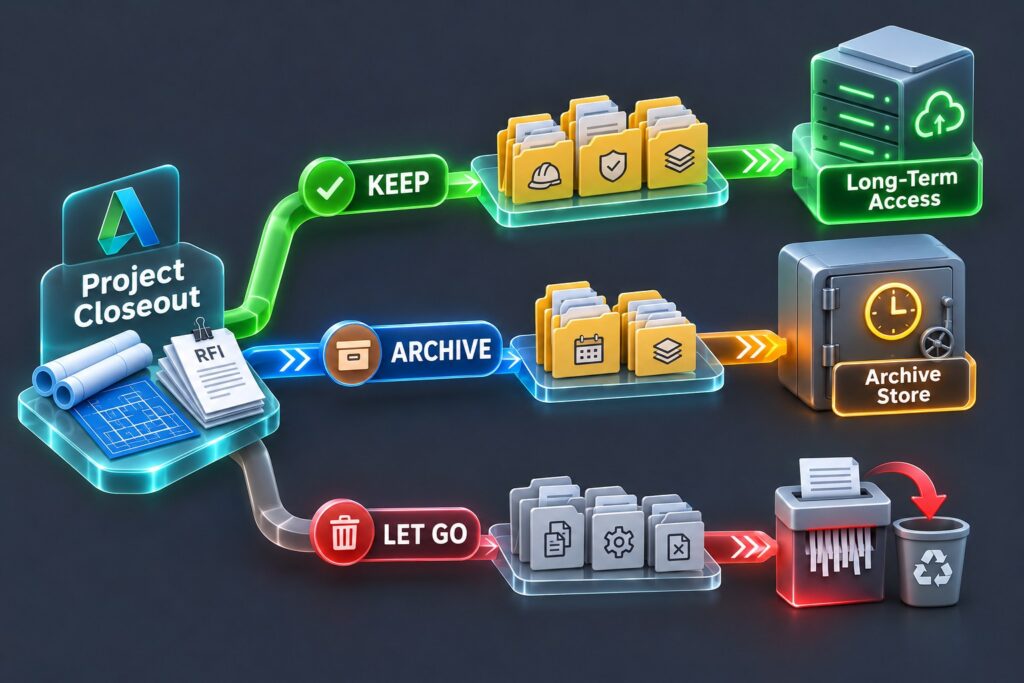
A simple framework helps: keep critical records immediately accessible, move supporting documentation to archival, and let go of what has no value after the project ends. And make sure the backup was running throughout.
Frequently Asked Questions
1. How long should Autodesk project data be kept after closeout?
Typically 6 to 10 years depending on jurisdiction and contract type. Warranty docs should stay accessible for the full warranty period, and financial records generally need 7 years.
2. What happens to Autodesk data after a subscription expires?
Access to BIM 360 or Autodesk Forma/ACC project data may be restricted when the subscription expires. Autodesk states that it may provide a brief retrieval period—for example, 30 days—after which the data may be deleted. Businesses should verify the terms that apply to their specific service and subscription.
3. What’s the difference between keeping data accessible and archiving it?
Keeping data accessible means maintaining it in a form intended for regular or relatively frequent retrieval. Archiving is better suited to data that needs to be retained but is expected to be accessed less frequently.
4. Does Autodesk Construction Cloud include long-term backup?
Autodesk provides native data-management and recovery capabilities, but businesses with long-term retention requirements should evaluate whether those capabilities match how long their project data needs to remain independently recoverable.
5. What project data can safely be deleted after closeout?
Temporary working files, duplicate documents, superseded drafts.