TL;DR
Native tools are built for everyday mistakes, not for ransomware, bulk deletions, or recovery after the retention window closes. This blog covers what your SaaS platform protects, what it doesn’t, and why an independent backup layer is now standard.
Yes, you do need a SaaS backup even if your platform already has native tools. Native tools like recycle bins and version history cover small mistakes. A full recovery is a different job.
A lot of businesses assume otherwise. HYCU’s State of SaaS Resilience report found that 70% of businesses lost data in their SaaS apps in a single year, and 60% still believed their SaaS provider was responsible for protecting it. On top of that, 37% rely only on native protection, according to Foundry’s 2025 research.
Your provider keeps the platform running. The data inside it is on you.
This blog covers what your SaaS platform protects, where native tools stop, the shared responsibility model, and why an independent backup layer is the standard setup now.
What Does Your SaaS Platform Protect?
Your SaaS platform protects itself really well. Servers, uptime, security at the infrastructure level, geographic redundancy. All of that is handled, and it’s handled well.
What it doesn’t promise is that your deleted folder, overwritten file, or encrypted library comes back whenever you ask. That’s the shared responsibility model: the provider looks after the platform, and you look after what you put in it.
What Do Native Tools Cover, and Where Do They Stop?
Native tools are good at what they were designed for. Here’s the side-by-side:
| Scenario | Native tools | Independent backup |
| File deleted yesterday | Recycle bin handles it | Covered |
| Older version needed | Version history handles it | Covered |
| Deletion found after the retention window | Often not recoverable | Covered |
| Ransomware encrypts files | Encrypted versions get saved too | Clean copy stays separate |
| Platform outage | Backup and data go down together | Copy lives elsewhere |
| Long-term retention needs | Limited by platform settings | You set the policy |
Retention is where the timing gets tight. Microsoft 365 keeps deleted items for 30 to 93 days depending on configuration. Google Drive trash is auto-deleted after 30 days, with a short admin recovery window after that.
When Do Native Tools Fall Short?
Three situations come up again and again.
- Someone deletes the wrong shared folder. The recycle bin catches it if you’re quick. If a project goes quiet for two months and then someone asks for those files, the window has closed.
- Ransomware spreads through synced files. Version history saves whatever version exists, including the encrypted one. You end up with clean and encrypted copies side by side, and no easy way to tell which restore point is safe.
- A team member leaves. Their account gets removed, files they owned go with it, and a shared folder disappears during the handover. Nobody finds out until someone needs it.
Why Is an Independent Backup Layer the Standard Now?
Because the two tools solve different problems.
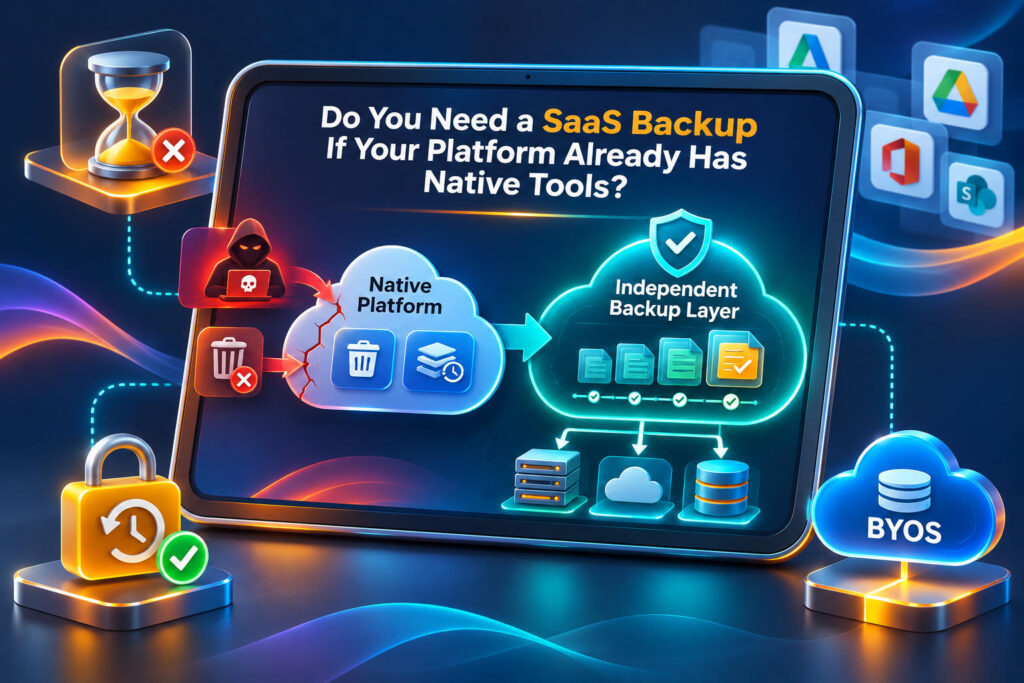
Native tools help your team work and fix small mistakes. An independent backup keeps a separate copy, outside the platform, that you control. If something goes wrong inside the platform, the copy is untouched.
Three things make a backup truly independent:
- It lives somewhere else. Not inside the platform it protects.
- It runs on its own. A schedule, not someone’s memory.
- You own the storage. Your retention rules, your access.
How Does Cloudsfer Help?
Cloudsfer is built for this layer, and it works for businesses running on Egnyte and Autodesk Construction Cloud.
- BYOS (Bring Your Own Storage). Your backup goes straight to storage you own, like Amazon S3 or Azure Blob Storage.
- Set & Forget scheduling. Pick a schedule once and it runs without anyone starting it.
- Incremental backups. After the first run, only new or changed data is transferred.
- Configurable retention. You decide how long backups are kept, instead of relying on platform defaults.
- Harmful extension blocking. Files with known ransomware-related extensions are blocked before they reach your backup destination.
You keep using your platform the way you always have. The backup just sits next to it.
The Mistakes Most Businesses Make
- Treating the recycle bin as a backup plan
- Assuming the vendor restores everything on request
- Setting up backup once and never checking coverage again
- Never testing a restore until it breaks
So, Do You Need a SaaS Backup?
If your business depends on the data inside your SaaS platform, yes. Native tools handle the small stuff well. An independent layer covers everything outside their limits, and it only works if it was already running before you needed it.
Request a free backup demo and see how Cloudsfer keeps an independent copy of your data in storage you own.
Frequently Asked Questions
- Does my SaaS provider back up my data?
They protect the platform. Recovering your data is your responsibility. - Is version history a backup?
No. It lives inside the same platform and has retention limits. - What is the shared responsibility model?
The provider secures the platform. You protect the data inside it. - How is independent backup different from native retention?
It’s a separate copy, stored outside the platform, kept as long as you decide. - What is BYOS?
Bring Your Own Storage. Backups go straight to storage you own and control.