TL;DR
A backup existing and a backup actually working are two different things. Here are 7 security checks most businesses skip and why skipping them is exactly how recoveries fail.
Let’s be honest, most businesses set up a backup, assume it’s working, and never think about it again.
Here’s what the data shows. According to Infrascale’s 2025 Data Loss Statistics report,[https://www.interweavetech.net/blog/risks-of-cloud-backup-for-companies-to-avoid] 85.6% of reported data incidents happened in the cloud. And only 54% of businesses hit by ransomware last year could restore from their backup which is the lowest rate in six years, according to Sophos.
Cloud backup security goes beyond having a backup somewhere. It is rather about where that backup lives and who can touch it.
This checklist covers the 7 things every business should verify before trusting their cloud backup and what a backup strategy built for cloud backup security looks like in practice.
1. Is Your Backup Stored Independently From Your Primary Environment?
This is the first thing to check. If your backup depends on the same environment, accounts, or access paths as your production data, a single incident can potentially affect both.
An independent backup lives in a destination you own and control completely outside the primary environment. Amazon S3, Azure Blob Storage, or a local file system, separate from the primary environment and managed under its own access controls.
Cloudsfer’s BYOS (Bring Your Own Storage) model sends backup data directly to storage you own. The backup stays independent from day one.
2. Who Has Access to Your Backup Data?
Access control is one of the most overlooked parts of cloud backup security. Ask yourself: who can access your backup right now? If the answer is “anyone with admin credentials to the primary platform,” that’s a problem. Credentials get compromised. Departing employees don’t always get fully deprovisioned. And insider threats are real.
Your backup access should be separate from your production access. Fewer people should be able to touch it. And that access should be logged.
3. Is Your Backup Data Encrypted: in Transit and at Rest?
Encryption is table stakes for cloud backup security, but it’s worth confirming.
Data in transit should be encrypted to prevent interception during transfer. Data at rest should be encrypted so that even if someone gets into the storage bucket, they can’t read what’s inside.
Check how your backup solution protects data in transit and at rest, and understand who controls access to the backup destination and its encryption configuration.
4. Does Your Backup Block Known Ransomware-Related Extensions Before They Get Stored?
This is the one most businesses never think to ask.
Ransomware encrypts the files in the background, over days or weeks, while your automated backup keeps running on schedule. By the time anyone notices, compromised files may already exist in recent backup copies.
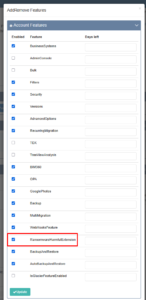
Blocking known ransomware-related extensions at the backup layer can help prevent affected files from being copied into the backup destination. Cloudsfer checks files for known ransomware-related extensions during the backup process and blocks them before they reach the backup destination. Administrators can manage the list of monitored extensions such as adding or removing entries based on their requirements.
5. How Often Is Your Backup Running?
Backup frequency determines how much data falls inside the gap between your last clean restore point and the moment something goes wrong.
A weekly backup schedule can leave you with close to seven days of changes between recovery points.
The right frequency depends on how much recent data your business can afford to lose. If losing up to a day of changes is acceptable, daily backups may fit the requirement. If the acceptable recovery gap is smaller, backups need to run more frequently.
Cloudsfer’s Set & Forget feature handles this. Configure your schedule once, and it runs without manual intervention. Daily, weekly, or hourly depending on what your environment needs.
6. Do Your Retention Policies Match Your Recovery Needs?
Native recovery and retention windows vary by platform, configuration, and data type, and they may not match how long your business needs data to remain recoverable.
Your backup retention policy needs to reflect how long your business needs to recover data.
Configurable retention policies let you align how long backup data is retained with your business and recovery requirements.
7. Have You Tested the Restore?
Most businesses know their backup is running. Far fewer have ever actually recovered from it. And a backup you’ve never tested is a backup you don’t really know works.
According to Datto’s 2025 State of BCDR Report,more than 60% of businesses believed they could recover from an incident in under 24 hours. Only 35% actually did. That gap highlights why recovery assumptions need to be tested before an actual incident.
A restore test should confirm: data comes back completely, permissions and structure are intact, and recovery takes as long as planned. If any of those fail during a test, that’s information. If they fail during an incident, that’s a crisis.
What Does a Secure Cloud Backup Strategy Look Like?
Run through the checklist above and you’ll start to see the shape of what a genuinely secure backup needs:
- Independent storage in a destination you own
- Access that’s separate from production credentials
- Encryption you control
- Controls that help prevent known ransomware-related files from entering the backup
- Automated scheduling that keeps restore points current
- Retention policies that match real recovery requirements
- A restore process that’s been tested before it’s urgent
Cloudsfer addresses several of these areas through independent customer-controlled storage, automated scheduling, incremental backups, configurable retention, ransomware-related extension blocking, and restore capabilities.
Request a free backup demo and see what cloud backup security looks like when it’s built right.
Frequently Asked Questions
1. What is cloud backup security?
It’s everything that determines whether your backup is actually usable when something goes wrong — where the data lives, who can access it, whether it’s encrypted, how frequently it runs, and whether it’s been tested.
2. Why do backups fail during ransomware recovery?
Recovery can fail if the backup is affected by the same incident as the primary environment, if compromised files have already been backed up, or if the required clean recovery point is no longer available.
3. How often should cloud backups run?
There is no single backup frequency that works for every business. The schedule should reflect how much recent data you can afford to lose. If losing up to a day of changes is acceptable, daily may be appropriate. If the acceptable recovery gap is smaller, backups should run more frequently.
4. What is BYOS and why does it matter for backup security?
Bring Your Own Storage means backup data goes directly to storage you own and control and not a vendor’s proprietary repository. It keeps your backup independent from both the primary environment and the backup vendor’s infrastructure.
5. Does having a backup mean you’re protected from ransomware?
Not automatically. If the backup lived in the same environment, or if encrypted files were captured before anyone noticed, the backup may contain compromised data. Independent storage, controls that help prevent compromised files from entering the backup, appropriate retention, and tested restore processes can strengthen ransomware recovery readiness.