TL;DR
Egnyte and SharePoint handle data differently, and so do their backup gaps. This blog breaks down where each platform’s native protection falls short, what that means for your data protection strategy, and how to build a cloud backup approach that actually covers both.
Most Egnyte vs. SharePoint comparisons focus on collaboration features, pricing, integrations, or document management capabilities.
But there’s another question that’s just as important:
Which platform leaves your backup strategy with more gaps?
The answer isn’t as simple as choosing one over the other. Egnyte and SharePoint are built differently, so the risks they introduce are different too. Each platform has its own approach to retention, permissions, version history, and recovery, cu the limitations of its native protection urcg.
According to Verizon’s 2025 Data Breach Investigations Report, human error—including accidental deletion, misconfiguration, and incorrect permission changes—continues to be a significant contributor to security incidents and data exposure. When those events occur, native platform capabilities may not always provide the level of recovery businesses expect.
A reliable backup strategy should account for those differences instead of assuming every SaaS platform protects data in the same way.
In this article, we’ll compare the backup gaps in Egnyte and SharePoint, explain where native protection reaches its limits, and explore what an independent cloud backup strategy should include to help strengthen data protection across both platforms.
How Does Egnyte Handle Data Protection Natively?
Egnyte is designed around file collaboration and content control. Its native protection includes version history, recycle bins, audit trails, and granular permission management, giving administrators strong visibility into how data is accessed and managed.
Those capabilities help resolve many everyday issues.
But they also have limits.
Retention periods vary depending on configuration and subscription plan. Once files move beyond those retention windows, they may no longer be recoverable. Version history can restore previous versions of files, but it also preserves encrypted versions if ransomware has already affected the data.
For businesses managing years of contracts, engineering documents, project files, or regulated content, those limitations can become recovery challenges rather than collaboration issues.
How Does SharePoint Handle Data Protection Natively?
SharePoint approaches data protection differently.
As part of Microsoft 365, it benefits from Microsoft’s resilient infrastructure, version history, recycle bins, and retention capabilities when properly configured.
Those features provide valuable protection for routine user mistakes.
However, they don’t eliminate the need for an independent backup strategy.
Deleted content remains recoverable only within available retention periods. Version history captures file changes—including unwanted ones—and Microsoft follows a shared responsibility model, where Microsoft protects the platform infrastructure while customers remain responsible for protecting their own data.
For businesses relying heavily on SharePoint for collaboration, document libraries, workflows, and company knowledge, recovery requirements often extend beyond what native capabilities alone are designed to provide.
Egnyte vs SharePoint: Where Are the Backup Gaps?
Although the platforms differ, many of the backup challenges are surprisingly similar.
| Backup Consideration | Egnyte | SharePoint |
| Version history | ✓ | ✓ |
| Recycle bin | ✓ | ✓ |
| Native retention | Varies by plan and configuration | Available through Microsoft 365 configuration |
| Granular permissions | ✓ | ✓ |
| Independent backup included | No | No |
| Long-term recovery depends on | Native retention settings | Microsoft 365 retention configuration |
| Customer responsible for the backup | Yes | Yes (shared responsibility model) |
| Best practice | Independent cloud backup | Independent cloud backup |
Neither platform leaves more backup gaps overall.
They just leave different ones.
That means businesses shouldn’t choose a backup strategy based solely on the platform they’re using. Instead, they should understand where native protection ends and where independent backup begins.
What Do These Differences Mean for Your Data Protection Strategy?
The biggest mistake businesses make is assuming every SaaS platform protects data the same way.
It doesn’t.
Egnyte and SharePoint manage retention differently. They organize permissions differently. They recover deleted content differently.
Your backup strategy should reflect those differences.
Instead of asking whether one platform is safer than the other, businesses should ask:
- How long can we recover deleted data?
- Are permissions and metadata preserved where supported?
- Can we recover after retention periods expire?
- Is backup data stored independently from the production environment?
- Have we tested our recovery process?
The answers to those questions matter far more than which collaboration platform you choose.
What Should an Independent Cloud Backup Strategy Include?
Regardless of whether your business uses Egnyte, SharePoint, or both, a resilient backup strategy should include:
- Automated backup schedules that keep recovery points current without manual intervention.
- Independent storage that keeps backup data separate from the production environment.
- Permissions and metadata preservation where supported, helping restore data with the context users expect.
- Incremental backups that transfer only new or modified data after the initial backup, improving efficiency while maintaining current recovery points.
- Reliable restore capabilities that support faster recovery when data loss occurs.
These capabilities help reduce recovery gaps regardless of which collaboration platform your business relies on.
How Cloudsfer Supports Both Egnyte and SharePoint
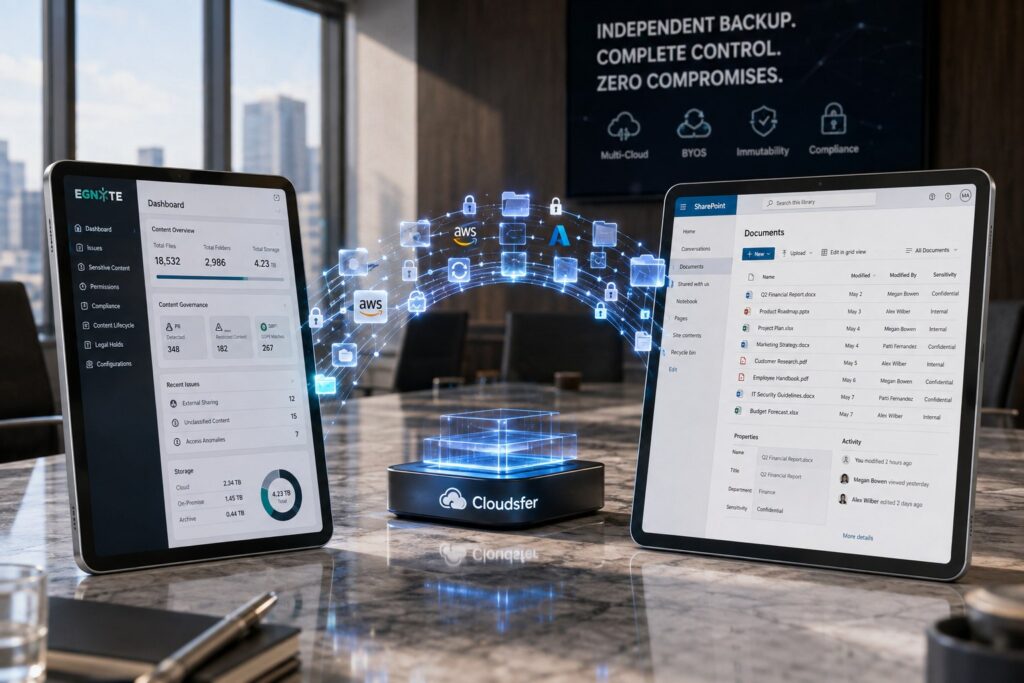
Cloudsfer helps businesses strengthen backup strategies for both Egnyte and SharePoint through an independent cloud backup solution designed around recovery.
- Bring Your Own Storage (BYOS)
Backup data is stored directly in destinations the business owns and controls, including Amazon S3, Azure Blob Storage, and other supported storage platforms.
- Automated scheduling
Cloudsfer’s Set & Forget automatically runs backups on schedules you define—daily, weekly, or hourly for higher-frequency protection.
- Permissions and metadata preservation
Where supported by the source platform, Cloudsfer preserves permissions and metadata to help restore data with the context users expect.
- Incremental backups
After the initial backup, only new or modified data is transferred, reducing backup windows while keeping recovery points current.
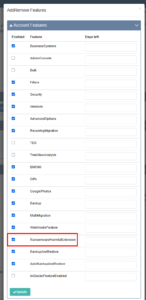
- Ransomware harmful extension blocking
Cloudsfer checks files for known ransomware-related extensions during the backup process and blocks them before they reach the backup destination. Administrators can manage the list of monitored extensions based on their requirements.
- Restore capabilities
Cloudsfer provides restore capabilities designed to help businesses recover data while minimizing operational disruption.
📌 Request a free backup demo
Conclusion
Egnyte and SharePoint are both powerful collaboration platforms, but neither was designed to replace an independent backup strategy.
The backup gaps they leave are different, not greater. Egnyte emphasizes governance and configurable retention, while SharePoint relies on Microsoft 365’s recovery capabilities and shared responsibility model. Understanding those differences helps businesses build a backup strategy that matches the platform they’re protecting instead of assuming one approach fits every environment.
The strongest data protection strategies combine native platform capabilities with independent cloud backup, automated scheduling, customer-controlled storage, and reliable restore capabilities.
FAQs
- Does Egnyte include built-in backup?
No. Egnyte provides native recovery features, but an independent backup is recommended for broader data protection. - Is SharePoint’s recycle bin enough for recovery?
Not always. Once retention periods expire, recovering deleted data may no longer be possible. - Which platform leaves more backup gaps?
Neither. Egnyte and SharePoint leave different gaps, so both benefit from an independent backup strategy. - Why is independent backup important?
It keeps backup data separate from the production environment, improving recovery flexibility and resilience. - How does Cloudsfer help protect Egnyte and SharePoint?
Cloudsfer provides automated backups, customer-controlled storage, incremental backups, restore capabilities, and preserves permissions and metadata where supported.